
Navigating through deeply nested project directories can slow down your daily workflow. While external tools exist to help jump around directories, you can easily build your own lightweight, robust solution right inside Zsh using a custom function and a simple text file.
The Complete Implementation
Below is the complete implementation of the custom script, saved as ~/scripts/cd_shortcuts.sh. It handles keyword shortcuts, duplicate checks, tab autocomplete, and preserves standard relative navigation like cd ..:
# Path to store your shortcuts
SHORTCUTS_FILE="$HOME/.cd_shortcuts.txt"
touch "$SHORTCUTS_FILE"

_custom_cd_logic() {
    case "$1" in
        "-h"|"--help")
            echo "Usage:"
            echo "  cd <shortcut>                -> Jump to a saved directory"
            echo "  cd -add <name of keyword>    -> Save current directory as a shortcut"
            echo ""
            echo "Available cd shortcuts:"
            echo "-----------------------"
            if [ ! -s "$SHORTCUTS_FILE" ]; then
                echo "No shortcuts added yet. Use 'cd -add <name>' to add one."
            else
                while IFS='=' read -r key val; do
                    printf "%-10s -> %s\n" "$key" "$val"
                done < "$SHORTCUTS_FILE"
            fi
            ;;
        "-add")
            if [ -z "$2" ]; then
                echo "❌ Please provide a name. Usage: cd -add <keyword>"
                return 1
            fi
            # Remove existing shortcut with the same name if it exists (cross-platform safe)
            sed -i "" "/^$2=/d" "$SHORTCUTS_FILE" 2>/dev/null || sed -i "/^$2=/d" "$SHORTCUTS_FILE"
            # Append the new shortcut (keyword=current_working_directory)
            echo "$2=$PWD" >> "$SHORTCUTS_FILE"
            echo "✅ Shortcut added: $2 -> $PWD"
            ;;
        "")
            builtin cd ;;
        *)
            # 1. If it's a real directory, a relative path (like ..), or a flag like '-'
            if [ -d "$1" ] || [ "$1" = "-" ]; then
                builtin cd "$@"
            else
                # 2. Otherwise, check if it matches a saved shortcut
                local target=$(grep "^$1=" "$SHORTCUTS_FILE" | cut -d'=' -f2-)
                if [ -n "$target" ]; then
                    builtin cd "$target"
                else
                    # 3. Fallback to standard cd (to show proper error message)
                    builtin cd "$@"
                fi
            fi
            ;;
    esac
}

# Zsh Autocomplete function
_cd_shortcuts_completion() {
    local -a shortcuts
    shortcuts=(-h --help -add)

    # Dynamically pull keywords from the text file for autocomplete
    if [ -f "$HOME/.cd_shortcuts.txt" ]; then
        while IFS='=' read -r key val; do
            shortcuts+=("$key")
        done < "$HOME/.cd_shortcuts.txt"
    fi

    _describe 'shortcuts' shortcuts
    _path_files -/
}
Activating the Custom Command in Zsh
To hook your new script into your shell session and override the default cd command, add the following snippet to your ~/.zshrc file:
# Load the shortcuts script and override cd
source ~/scripts/cd_shortcuts.sh
cd() { _custom_cd_logic "$@"; }
compdef _cd_shortcuts_completion cd
Once saved, reload your terminal configuration using:
source ~/.zshrc
Adapting the Setup for Bash
While the core directory navigation logic (`_custom_cd_logic`) works identically in Bash, the auto-completion mechanism needs to be adapted. Bash uses `compgen` and `COMPREPLY` instead of Zsh's `_describe`, and registers completions via the `complete` builtin rather than `compdef`.
1. The Bash Autocomplete Function Adjustment
Replace the Zsh autocomplete block inside your script with the following Bash-compatible version:
# Bash Autocomplete function
_cd_shortcuts_completion() {
    local cur shortcuts
    cur="${COMP_WORDS[COMP_CWORD]}"

    # Base options
    shortcuts="-h --help -add"

    # Dynamically pull keywords from the text file for autocomplete
    if [ -f "$HOME/.cd_shortcuts.txt" ]; then
        while IFS='=' read -r key val; do
            shortcuts="$shortcuts $key"
        done < "$HOME/.cd_shortcuts.txt"
    fi

    # Generate completions matching what the user has typed so far
    COMPREPLY=( $(compgen -W "$shortcuts" -- "$cur") )
}
2. Activating in Bash (`~/.bashrc`)
To register the override and completion hook inside a Bash environment, add this snippet to your `~/.bashrc` file instead:
# Load the shortcuts script, override cd, and set up Bash completion
source ~/scripts/cd_shortcuts.sh
cd() { _custom_cd_logic "$@"; }
complete -F _cd_shortcuts_completion cd
After saving, reload your Bash session using:
source ~/.bashrc
Key Benefits
- Familiarity: Standard operations like
cd ..andcd -work out of the box. - Speed: Quickly save deep paths using
cd -add keywordand jump to them instantly withcd keyword. - Smart Autocomplete: Pressing Tab after typing
cdwill present both custom shortcuts and native system paths.
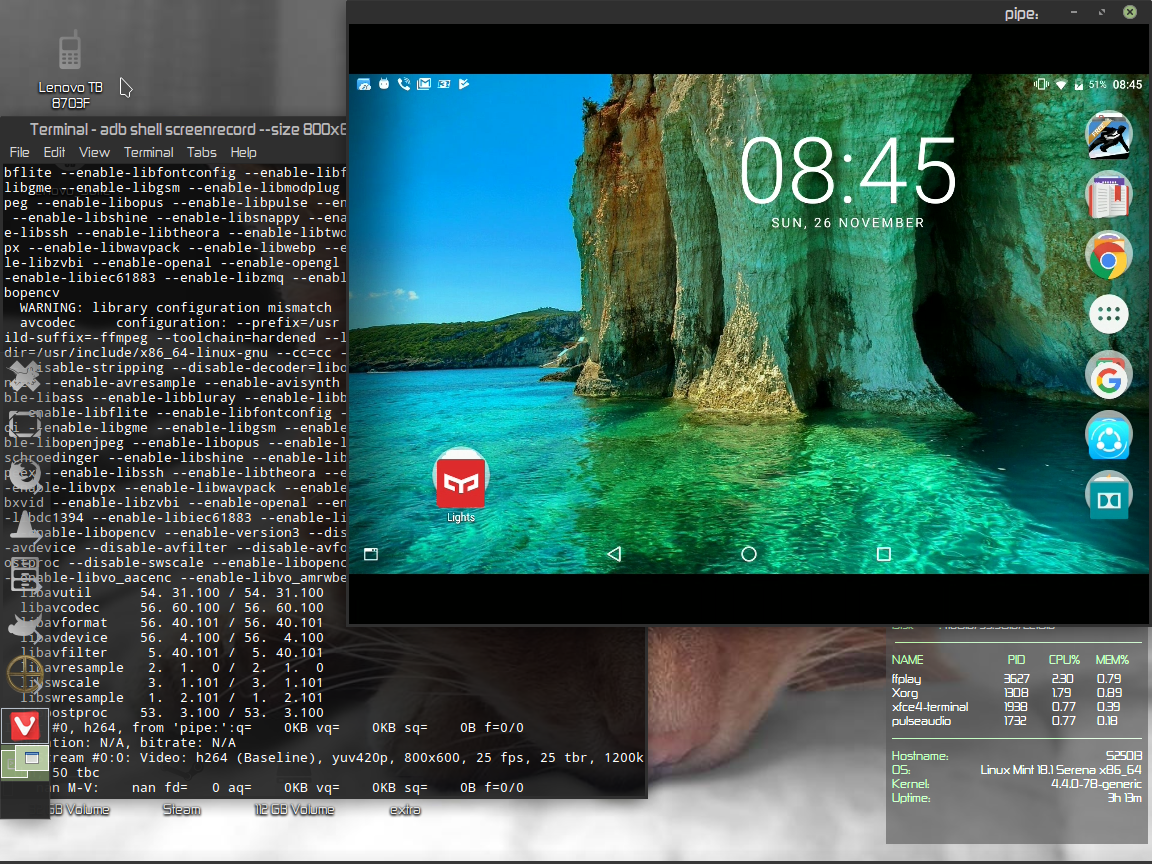
Tutorial how to connect your android device in linux
Install the adb tools if you don't have in your system
sudo apt-get install android-tools-adb
Connect your device from usb (in your device at Developer option>USB debugging -must be enabled)
Check if the device is connected
adb devices
You must have install ffmpeg .
In the terminal :
adb shell screenrecord --size 1152x864 --output-format=h264 - | ffplay -
Size:the resolution of your screen
Vlc is my favorite player (in not the best but is flexible ) and i use it for all the media from watch videos or listen to web radio to watch TV with DVB-t usb stick.
Some of the commands to do all that with different skins cause i prefer a more spartan look for video and more feautures on a radio skin.
TV player
For starters I made a lanucher in the desktop
vlc -I skins2 --skins2-last=/[path-to-yourfavorite-skin-and-the-name.vlt] /[path-to-you-tv-config-file] --dvb-budget-mode
The config file for the dutch tv is part of it(use the link to download the file)
Nederland 1:618000000:INVERSION_AUTO:BANDWIDTH_8_MHZ:FEC_AUTO:FEC_AUTO:QAM_64:TRANSMISSION_MODE_8K:GUARD_INTERVAL_1_4:HIERARCHY_NONE:7011:7012:1101
Nederland 2:618000000:INVERSION_AUTO:BANDWIDTH_8_MHZ:FEC_AUTO:FEC_AUTO:QAM_64:TRANSMISSION_MODE_8K:GUARD_INTERVAL_1_4:HIERARCHY_NONE:7021:7022:1102
Nederland 3:618000000:INVERSION_AUTO:BANDWIDTH_8_MHZ:FEC_AUTO:FEC_AUTO:QAM_64:TRANSMISSION_MODE_8K:GUARD_INTERVAL_1_4:HIERARCHY_NONE:7031:7032:1103
TV Noord-Holland:618000000:INVERSION_AUTO:BANDWIDTH_8_MHZ:FEC_AUTO:FEC_AUTO:QAM_64:TRANSMISSION_MODE_8K:GUARD_INTERVAL_1_4:HIERARCHY_NONE:7041:7042:1104
That looks like that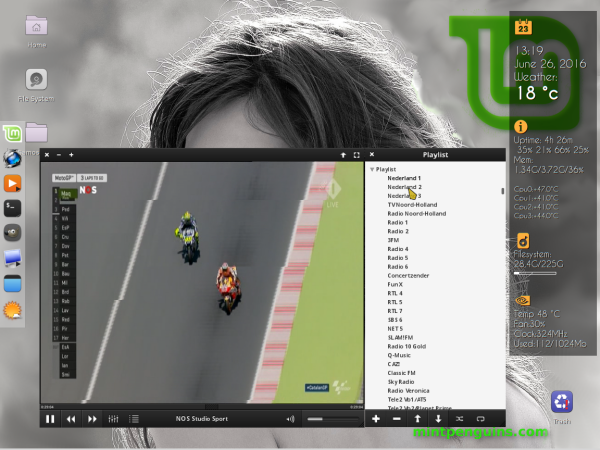
VLC and radio
I use differnet skin for radio and of course i have a .pls file for all my radio stations
vlc -I skins2 --skins2-last=/[path-to-vlc-skin-and-name-of-the-skin-vlt] --started-from-file /path-to-pls-file-with-your-favorite-stations
The format of the .pls is like :
file1=http://metal2k.org:8010/metal2k.mp3
title1=M2k
And look something like that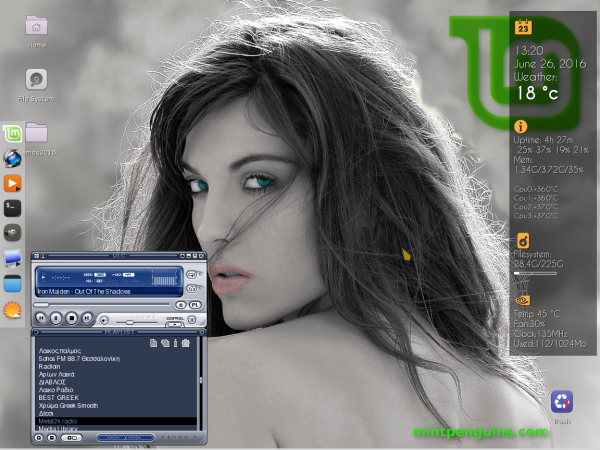
Of cousre you can do it from terminal if you dont want to make it launchers in your panels.
I like vlc and if you like the mini tutorial thumbs up.
PCSX2 Emulator is a PlayStation 2 Emulator developed and maintained by PCSX2 Team. It has open sources license as well as freeware application you don’t need to pay any money for this software’s.In its latest stable release, many PS2 games are playable, and several games have full functionality.
The current stable version is reported to be fully compatible with around 90% of the PS2 library. The main c in PS2 emulation is emulating the multi-processor PS2 on a PC 32-bit as well as 64-bit architecture.It is based core on a plug-in architecture, separating several functions from the core emulator.
Different plug-ins may produce different results in both compatibility and performance of the PCSX2 Emulator.It Support Linux Operating System Platform.
# add-apt-repository ppa:gregory-hainaut/PCSX2.official.ppa
# apt-get update
# apt-get install PCSX2
$ PCSX2
Then need to configure the emulator
1.First time System Configuration
2.First time Plugin Configuration
3.First time Bios Selection
4.Setting of PS2 Controllers
and you are rwady to run your game.
(For running PS2 games you must have official PS2 games DVD and Obtaining PS2 games can be as easy as buying PS2 DVDs then make it .ISO images for smooth run of games.)
Sources and info:
www.thetechbrown.com
www.github.com
Quick tutorial how to run a webradio on your linux server with icecast2 and ezcast.