Vlc is my favorite player (in not the best but is flexible ) and i use it for all the media from watch videos or listen to web radio to watch TV with DVB-t usb stick.
Some of the commands to do all that with different skins cause i prefer a more spartan look for video and more feautures on a radio skin.
TV player
For starters I made a lanucher in the desktop
vlc -I skins2 --skins2-last=/[path-to-yourfavorite-skin-and-the-name.vlt] /[path-to-you-tv-config-file] --dvb-budget-mode
The config file for the dutch tv is part of it(use the link to download the file)
Nederland 1:618000000:INVERSION_AUTO:BANDWIDTH_8_MHZ:FEC_AUTO:FEC_AUTO:QAM_64:TRANSMISSION_MODE_8K:GUARD_INTERVAL_1_4:HIERARCHY_NONE:7011:7012:1101
Nederland 2:618000000:INVERSION_AUTO:BANDWIDTH_8_MHZ:FEC_AUTO:FEC_AUTO:QAM_64:TRANSMISSION_MODE_8K:GUARD_INTERVAL_1_4:HIERARCHY_NONE:7021:7022:1102
Nederland 3:618000000:INVERSION_AUTO:BANDWIDTH_8_MHZ:FEC_AUTO:FEC_AUTO:QAM_64:TRANSMISSION_MODE_8K:GUARD_INTERVAL_1_4:HIERARCHY_NONE:7031:7032:1103
TV Noord-Holland:618000000:INVERSION_AUTO:BANDWIDTH_8_MHZ:FEC_AUTO:FEC_AUTO:QAM_64:TRANSMISSION_MODE_8K:GUARD_INTERVAL_1_4:HIERARCHY_NONE:7041:7042:1104
That looks like that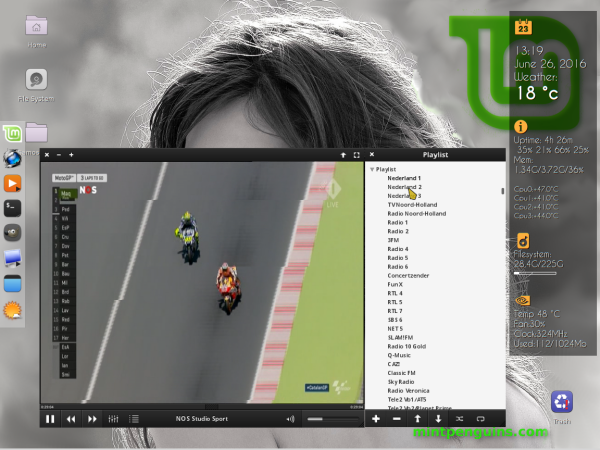
VLC and radio
I use differnet skin for radio and of course i have a .pls file for all my radio stations
vlc -I skins2 --skins2-last=/[path-to-vlc-skin-and-name-of-the-skin-vlt] --started-from-file /path-to-pls-file-with-your-favorite-stations
The format of the .pls is like :
file1=http://metal2k.org:8010/metal2k.mp3
title1=M2k
And look something like that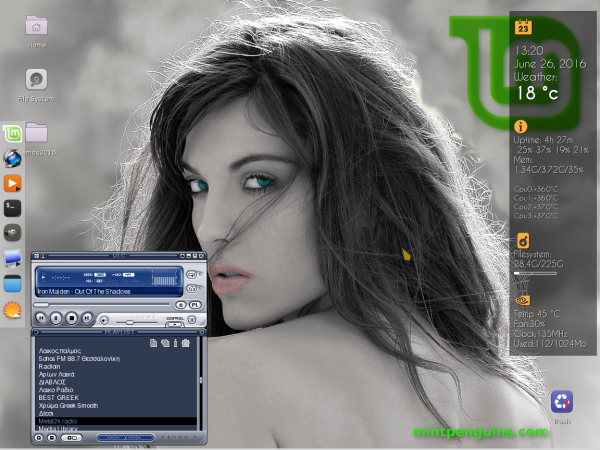
Of cousre you can do it from terminal if you dont want to make it launchers in your panels.
I like vlc and if you like the mini tutorial thumbs up.