
Pink + Purple ==Fuchsia(a new Operating System)
For years, Google has developed two operating systems side-by-side in Android for mobile devices and Chrome OS for laptops and desktops. But it looks as though Google now has a third operating system project underway known as Fuchsia.
Although Google isn't revealing much, Android Police dug into the documentation for the project on GitHub and discovered more details about the OS. The biggest takeaway, Android Police notes, is that Fuchsia's kernel, known as Magenta, is designed to work across a wide range of devices—from small "embedded devices" all the way up to desktops and laptops.In addition, Fuchsia makes use of Google's Dart programming language, as well as the company's Material Design-friendly Flutter user interface framework.
Enter “Fuchsia.” Google’s own description for it on the project’s GitHub page is simply, “Pink + Purple == Fuchsia (a new Operating System)”. Not very revealing, is it? When you begin to dig deeper into Fuchsia’s documentation, everything starts to make a little more sense.
First, there’s the Magenta kernel based on the ‘LittleKernel’ project. Just like with Linux and Android, the Magenta kernel powers the larger Fuchsia operating system. Magenta is being designed as a competitor to commercial embedded OSes, such as FreeRTOS or ThreadX.
However, Magenta is designed to scale much better, enabling Magenta to work on embedded devices, smartphones, and desktop computers. For this to happen, Magenta improves upon its LittleKernel base by adding first class user-mode support (a necessity for user accounts) and a capability-based security model (which would enable something like Android 6.0’s permissions to work).
But that’s just the kernel; what about the rest of the OS? It looks like Google is using Flutter for the user interface, as well as Dart as the primary programming language. The icing on the cake is Escher, a renderer that supports light diffusion, soft shadows, and other visual effects, with OpenGL or Vulkan under the hood. Shadows and subtle color reflections are a key component of Material Design, so it seems Flutter and Escher could be designed for the Material Design UI in mind.
 |
Swift. A powerful open language that lets everyone build amazing apps. Swift is a robust and intuitive programming language created by Apple for building apps for iOS, Mac, Apple TV, and Apple Watch. It’s designed to give developers more freedom than ever. Swift is easy to use and open source, so anyone with an idea can create something incredible. Swift has been refined from the ground up. It generates faster code across the board, both for release and debug builds. The Swift compiler is also faster, even while adding new Fix-it suggestions such as where you can use let instead of var. Comments can include Markdown syntax to add rich text and embedded images that display in Xcode’s Quick Help. A new assistant shows your Swift API in a “header-like” view. And new syntax features combined with improvements to the Cocoa frameworks and Objective-C will make your code more expressive, and even safer. |
Syntax improvements
New syntax features let you write more expressive code while improving consistency across the language. The SDKs have employed new Objective-C features such as generics and nullability annotation to make Swift code even cleaner and safer. Here is just a sampling of Swift 2.0 enhancements.
- Powerful control flow with do, guard, defer, and repeat
- Keyword naming rules unified for functions and methods
- Protocol extensions and default implementations
- Extended pattern matching to work in if clauses and for loops
Xcode 7 includes a powerful migrator that will help convert your application and playground code to work with the latest syntax improvements in Swift 2.0.
Error handling model
An advanced error handling model provides clear, expressive syntax for catching and throwing errors. It’s also easy to create your own custom error types so you can describe error cases with clear, meaningful names. The new error model was designed to work seamlessly with NSError and the Cocoa frameworks. Error handling code now looks like:
func loadData() throws { }

func test() {
	do {
		try loadData()
	} catch {
		print(error)
	}
Availability
You should always use the latest SDK to get access to the latest features, documentation, and API changes, but sometimes your app needs to run on an older OS. Swift 2.0 has built-in availability checking to make it easy to build the best possible app for each target OS version. The compiler will give you an error when using an API too new for your minimum target OS, and a new keyword lets you wrap blocks of code in a conditional version check to run only on specific OS releases.
Modern
Swift is the result of the latest research on programming languages, combined with decades of experience building Apple platforms. Named parameters brought forward from Objective-C are expressed in a clean syntax that makes APIs in Swift even easier to read and maintain. Inferred types make code cleaner and less prone to mistakes, while modules eliminate headers and provide namespaces. Memory is managed automatically, and you don’t even need to type semi-colons. All this modern thinking results in a language that is easy and fun to use.
extension String {
    var banana : String {
    	let shortName = String(characters.dropFirst(1))
    	return "\(self) \(self) Bo B\(shortName) Banana Fana Fo F\(shortName)"
	}
}

let bananaName = "Jimmy".banana		// "Jimmy Jimmy Bo Bimmy Banana Fana Fo Fimmy"
Swift has many other features to make your code more expressive:
- Closures unified with function pointers
- Tuples and multiple return values
- Generics
- Fast and concise iteration over a range or collection
- Structs that support methods, extensions, and protocols
- Functional programming patterns, e.g., map and filter
- Native error handling using try / catch / throw
Now is avaliable for linux.
Specifically, Swift 2.2 includes support for Swift on Ubuntu Linux 14.04 and 15.10. Apple admits that "The Linux port is still relatively new and in this release does not include the Swift Core Libraries (which will appear in Swift 3). The port does, however, include LLDB, a debugger, and the REPL [Read Eval Print Loop]."
Otherwise, this is a relatively minor release. Still, this "release includes contributions from 212 non-Apple contributors -- changes that span from simple bug fixes to enhancements and alterations to the core language and Swift Standard Library."
Maybe Apple is starting to get the open-source religion as well. After all, if Microsoft can convert, why not Apple?
Download Swift2 for linux
More info about Swift2
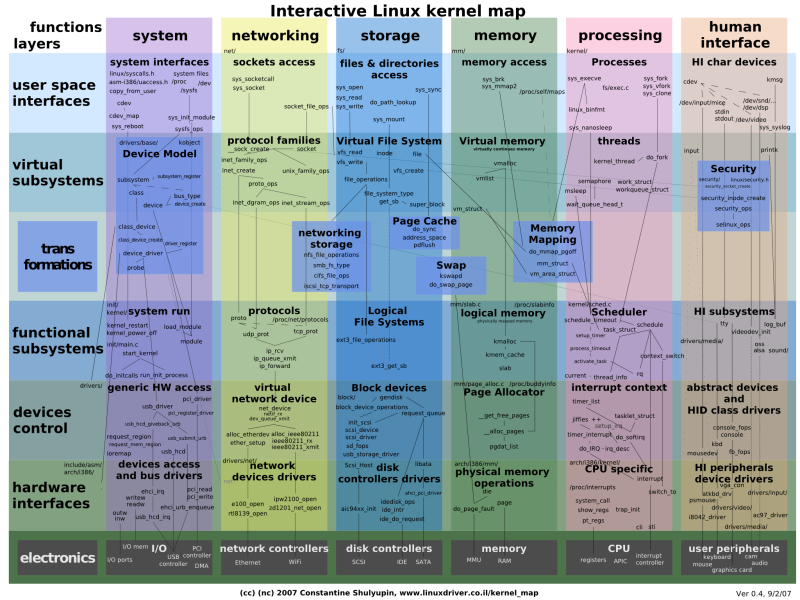 |
Just a few minutes ago, on January 3, 2015 (EST time), Linus Torvalds proudly announced the immediate availability for download and testing of the eighth and last RC (Release Candidate) version of the upcoming Linux 4.4 LTS kernel. According to Mr. Torvalds, Linux kernel 4.4 LTS Release Candidate 8 is the last milestone before the final version, which should arrive next weekend, on January 10, 2016. It's an even smaller build when compared with the previous RC, bringing updates to several drivers, mostly network stuff, architecture improvements, especially for ARM and SPARC, general networking changes, as well as a few crypto fixes. |
"Normally, me doing an eighth release candidate means that there is some unresolved issue that still needs more time to get fixed," said Linus Torvalds in today's announcement. "This time around, it just means that I want to make sure that everybody is back from the holidays and there isn't anything pending, and that people have time to get their merge window pull requests all lined up."
As usual, those of you who like testing Release Candidate versions of the Linux kernel on a Sunday evening can download Linux kernel 4.4 LTS RC8 right now either via Softpedia or from the kernel.org website. However, please try to keep in mind that these are development versions of the Linux kernel, so don't use them in production environments because they might break something. Happy testing!
Source[http://linux.softpedia.com/]
Kernel[https://git.kernel.org/cgit/linux/kernel/git/torvalds/linux.git/log/?id=refs/tags/v4.4]

Google Chrome is to drop support for all 32-bit Linux distros from March, 2016.
The change, which brings the platform in line with that of Mac OS X, will apply to all x86 Linux builds, regardless of distribution or version number.
Users affected will still be able to use Chrome after the axe has fallen, but they will no longer receive any updates.
In a double-whammy, March will also see Google Chrome stop supporting Ubuntu 12.04 LTS (which will receive critical and security bug fixes from Canonical until mid 2017).
‘Ubuntu users are advised to upgrade to a 64-bit version of Ubuntu 14.04 LTS or later’
From this March only 64-bit versions of Ubuntu 14.04 LTS (or later) will receive new versions of the browser from Google .
To run a supported version of Google Chrome Precise users are advised to upgrade to a 64-bit version of Ubuntu 14.04 LTS (or later).
Why Is Google Dropping Support?
The small Google Chrome Linux team can’t support all versions of Ubuntu and other Linux distributions indefinitely. With Linux already a small overall percentile of Chrome’s user base, and 32-bit users amongst that percentage even smaller, something had to give at some point.
The build infrastructure used to package Google Chrome is tasked with making hundreds of binaries each day, and human effort is required to test those binaries for release.
“To provide the best experience for the most-used Linux versions, we will end support for Google Chrome on 32-bit Linux, Ubuntu Precise (12.04), and Debian 7 (wheezy) in early March, 2016,” says Chromium engineer Dirk Pranke.
32-bit ChromiumIs Not Affected
‘Chromium is unaffected by the change. ‘
Many Linux users run Chromium, the open-source basis of Chrome, and so won’t be affected by this change. Google Chrome and Chrome OS builds for 32-bit ARM are similarly unaffected.
For browsers built on Chromium, like Opera, it will be up to them as to whether they continue to offer builds for 32-bit users.
Google says it will ‘keep support for 32-bit build configurations on Linux to support building Chromium’, which we’re told it will do so for ‘some time to come’.
Do you use Google Chrome on a 32-bit version of Linux? Will you switch to another browser? Perhaps you think this decision is logical. Whatever your view on this decision you can share it in the comments below.
From chromium:
Hi Everyone,
To provide the best experience for the most-used Linux versions, we will end support for Google Chrome on 32-bit Linux, Ubuntu Precise (12.04), and Debian 7 (wheezy) in early March, 2016. Chrome will continue to function on these platforms but will no longer receive updates and security fixes.
We intend to continue supporting the 32-bit build configurations on Linux to support building Chromium. If you are using Precise, we’d recommend that you to upgrade to Trusty.
Kind Regards,
-- Dirk Pranke

As a student, getting involved in open source is a great way to improve your programming skills. From my experience, it can even help kickstart your career. But where do you begin? And how do you get involved?
I started my open source journey during my high school days when I had a lot more free time on my hands (and lived on IRC). It was through that experience that I learned how to contribute to open source through communication media like IRC and Usenet. Open source has grown since those olden days, and there are now more formal ways to get involved with open source as a student.