Level Up Your Terminal: Meet ls., Your New Favorite Custom Directory Lister
We’ve all typed ls millions of times. It’s the muscle-memory command of the command-line world. But out of the box, standard ls can sometimes feel a bit dry, requiring a clumsy mix of flags like ls -laht just to get a clear picture of what’s happening in your directory.
Enter ls—a custom-built, feature-rich Bash script designed to give you an intuitive, color-coded, and deeply informative view of your files at a single glance.
Why Build a Custom ls ?
While modern terminal utilities offer rich directory browsing, rolling your own Bash script gives you absolute control over how information is presented. The ls. command was born out of a desire for cleaner categorization, better color contrast, and immediate insight into file sizes, permissions, and modification timelines without drowning in clutter.
Key Features of ls
-
Smart Categorization: The script automatically separates your workspace into three distinct buckets: Directories, Executables (including Python and PHP scripts), and Regular Files.
-
Vibrant Color Coding:
-
Directories stand out in a bold Dark Green.
-
Executables pop with a Light Green text on a Dark Green background.
-
Regular Files keep a clean, readable White text.
-
Headers & Metadata use eye-catching highlights (like bright green dates and yellow target indicators) so your eyes immediately catch what matters.
-
Powerful Flags at Your Fingertips
Instead of memorizing complex flag combinations, ls keeps things modular with clean, intuitive options:
Usage:
ls. [OPTIONS] [DIRECTORY]
-
-s(Size): Displays human-readable file sizes (e.g.,[1.5M],[3.2K],[278B]) right next to your files. -
-u(User & Permissions): Unmasks the owner and permission strings (e.g.,[USER -rwxr-xr-x]), making security audits effortless. -
-d(Date & Sorting): Shows the exact modification timestamp and automatically sorts every category with the newest files first. -
-h(Help): Pulls up a built-in guide complete with examples and color legends.
See It in Action
Imagine you want to inspect your scripts folder, checking who owns each file, how large they are, and when they were last modified, all sorted by recent activity. You simply run:
ls. -sud ~/.scripts
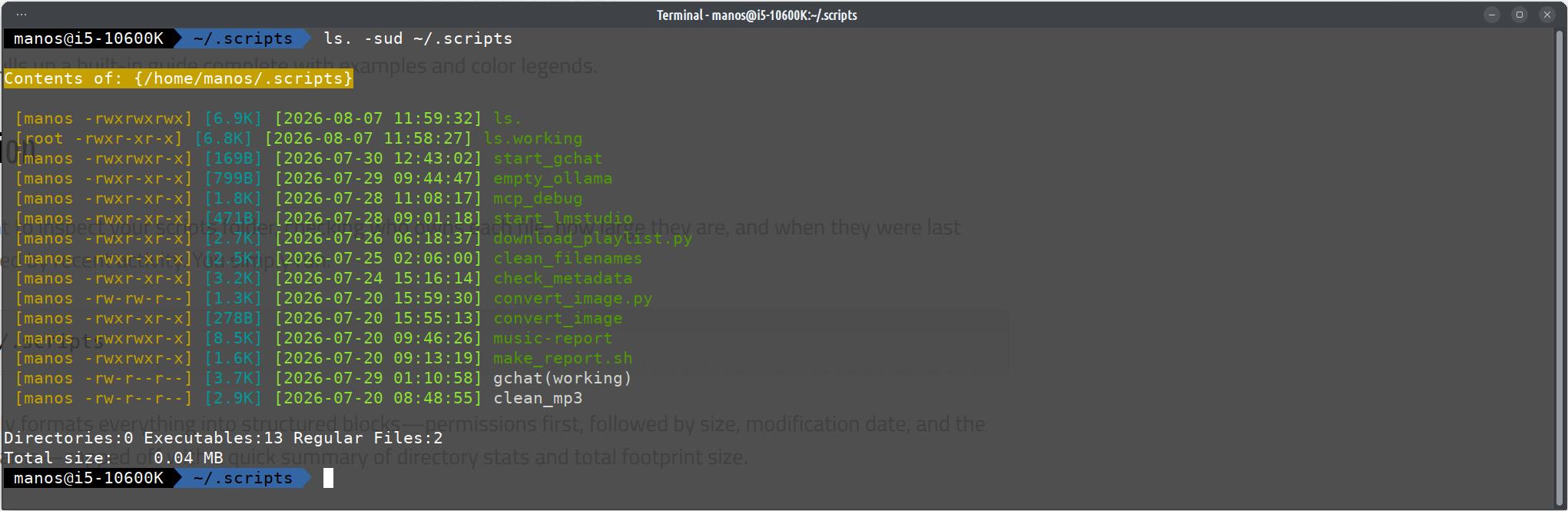
The output cleanly formats everything into structured blocks—permissions first, followed by size, modification date, and the color-coded filename—capped off with a quick summary of directory stats and total footprint size.
How I make that command?
In a directory that you keep all your command I have the ~/.scripts so I can use my commands in any directory
Create a shell file named ls. or how you want to call the custom ls command
paste the code feel free to modify the script
#!/bin/bash
#======================================================================
#      Custom ls. command
#      Made by Alice
#      mintpenguins.com
#      Please do not delete the remarks ,happy coding
#======================================================================
# --- Configuration ---
# Colors
DARK_GREEN_TEXT='\033[1;32m'      # Directories (Bold Green)
LIGHT_GREEN_FG='\033[0;32m'       # Executables (Standard Green)
EXEC_BG='\033[42m'                # Executables Background (Dark Green)
WHITE_TEXT='\033[0;37m'           # Regular Files (White)
BG_Y_TEXT='\e[43m'                # Target Directory Header Background (Yellow)

RESET='\033[0m'
SIZE_COLOR='\033[0;36m'           # Cyan for sizes
PERM_COLOR='\033[0;33m'           # Yellow for permissions/user
DATE_COLOR='\e[0;92m'             # Bright Green for date
HELP_COLOR='\033[1;36m'           # Cyan for help

# --- Arguments Handling ---
TARGET_DIR=""
SHOW_SIZE=false
SHOW_USER_PERM=false
SHOW_DATE=false
HELP=false

while [[ $# -gt 0 ]]; do
    arg="$1"

    if [[ "$arg" == -* ]] && [[ "$arg" != "--" ]]; then
        flags="${arg:1}"
        for (( i=0; i<${#flags}; i++ )); do
            char="${flags:$i:1}"
            case "$char" in
                s) SHOW_SIZE=true ;;
                u) SHOW_USER_PERM=true ;;
                d) SHOW_DATE=true ;;
                h) HELP=true ;;
                *)
                    echo "Error: Unknown option '-$char' in '$arg'. Use -h for help."
                    exit 1
                    ;;
            esac
        done
        shift
    else
        TARGET_DIR="$arg"
        shift
    fi
done

# --- Help Message ---
if [[ "$HELP" == true ]]; then
    echo -e "${HELP_COLOR}Usage: ls. [OPTIONS] [DIRECTORY]${RESET}"
    echo ""
    echo "  ${HELP_COLOR}ls.${RESET}                Show colored directory listing."
    echo "  ${HELP_COLOR}-s${RESET}                 Show file size (e.g., 1.5M) next to name."
    echo "  ${HELP_COLOR}-u${RESET}                 Show user and permissions (e.g., manos drwxr-xr-x)."
    echo "  ${HELP_COLOR}-d${RESET}                 Show modification date and sort by date (newest first)."
    echo "  ${HELP_COLOR}-h, --help${RESET}         Show this help message."
    echo ""
    echo "  ${HELP_COLOR}[DIRECTORY]${RESET}        List contents of a specific directory."
    echo ""
    echo "Colors:"
    echo "  {Directory}    : Dark Green"
    echo "  Executables    : Light Green text on Dark Green background"
    echo "  .py/.php files : Light Green text on Dark Green background"
    echo "  Regular Files  : White"
    echo ""
    echo "Output Order (when multiple flags are used):"
    echo "  [Permissions] [Size] [Date] Filename"
    echo ""
    echo -e "${PERM_COLOR}Examples:"
    echo "  ls.                    # List current directory"
    echo "  ls. -s                 # List with sizes"
    echo "  ls. -u                 # List with user/permissions"
    echo "  ls. -d                 # List with modification dates (sorted newest first)"
    echo "  ls. -sud Music         # List 'Music' folder with permissions, sizes, and dates"
    exit 0
fi

# --- Target Directory Check ---
if [[ -n "$TARGET_DIR" ]]; then
    if [[ ! -e "$TARGET_DIR" ]]; then
        echo "Error: '${TARGET_DIR}' does not exist."
        exit 1
    fi
    if [[ ! -d "$TARGET_DIR" ]]; then
        echo "Error: '${TARGET_DIR}' is not a directory."
        exit 1
    fi
    cd "$TARGET_DIR" || exit
fi

# --- Statistics & Classification ---
DIR_COUNT=0
EXEC_COUNT=0
FILE_COUNT=0
TOTAL_SIZE=0
declare -a DIRS
declare -a EXECS
declare -a FILES

# Helper to get human-readable size
get_size() {
    local bytes=$1
    if (( bytes >= 1073741824 )); then
        echo "$(echo "scale=1; $bytes/1073741824" | bc)G"
    elif (( bytes >= 1048576 )); then
        echo "$(echo "scale=1; $bytes/1048576" | bc)M"
    elif (( bytes >= 1024 )); then
        echo "$(echo "scale=1; $bytes/1024" | bc)K"
    else
        echo "${bytes}B"
    fi
}

# Helper to get user and permissions
get_perms() {
    local item=$1
    local perms=$(stat -c '%A' "$item")
    local user=$(stat -c '%U' "$item")
    echo "${user} ${perms}"
}

# Helper to get modification date
get_date() {
    local item=$1
    local mtime=$(stat -c '%y' "$item" | cut -d'.' -f1)
    echo "$mtime"
}

# Helper to sort an array by modification date (newest first)
sort_by_mtime() {
    local -n arr_ref=$1
    if (( ${#arr_ref[@]} > 1 )); then
        local -a sorted_items=()
        while IFS= read -r line; do
            [[ -n "$line" ]] && sorted_items+=("$line")
        done < <(
            for item in "${arr_ref[@]}"; do
                local mtime
                mtime=$(stat -c '%Y' "$item" 2>/dev/null || echo 0)
                printf "%s\t%s\n" "$mtime" "$item"
            done | sort -t$'\t' -k1,1nr | cut -f2-
        )
        arr_ref=("${sorted_items[@]}")
    fi
}

# Scan directory
for item in * .*; do
    [[ "$item" == "." || "$item" == ".." || ! -e "$item" ]] && continue

    if [[ -d "$item" ]]; then
        DIRS+=("$item")
        ((DIR_COUNT++))
    elif [[ -f "$item" ]]; then
        size=$(stat -c%s "$item" 2>/dev/null || echo 0)
        TOTAL_SIZE=$((TOTAL_SIZE + size))

        if [[ -x "$item" || "$item" == *.py || "$item" == *.php ]]; then
            EXECS+=("$item")
            ((EXEC_COUNT++))
        else
            FILES+=("$item")
            ((FILE_COUNT++))
        fi
    fi
done

# Sort by date (newest first) if -d flag is enabled
if [[ "$SHOW_DATE" == true ]]; then
    sort_by_mtime DIRS
    sort_by_mtime EXECS
    sort_by_mtime FILES
fi

TOTAL_MB=$(echo "$TOTAL_SIZE" | awk '{printf "%.2f", $1/1024/1024}')

# --- Display ---
if [[ -n "$TARGET_DIR" ]]; then
    echo -e "\n${BG_Y_TEXT}Contents of: {${TARGET_DIR}}${RESET}\n"
fi

print_list() {
    local type="$1"
    shift
    local items=("$@")

    for item in "${items[@]}"; do
        local prefix=""

        # Build prefix based on flags (Order: Permissions -> Size -> Date)
        if [[ "$SHOW_USER_PERM" == true ]]; then
            local perm_info=$(get_perms "$item")
            prefix+=" ${PERM_COLOR}[$perm_info]${RESET}"
        fi

        if [[ "$SHOW_SIZE" == true ]]; then
            local bytes=$(stat -c%s "$item" 2>/dev/null || echo 0)
            local h_size=$(get_size "$bytes")
            prefix+=" ${SIZE_COLOR}[$h_size]${RESET}"
        fi

        if [[ "$SHOW_DATE" == true ]]; then
            local date_info=$(get_date "$item")
            prefix+=" ${DATE_COLOR}[$date_info]${RESET}"
        fi

        # Format the line based on type
        if [[ "$type" == "DIR" ]]; then
            # Directory: [Permissions] [Size] [Date] {Name}
            echo -e "${prefix} ${DARK_GREEN_TEXT}{${item}}${RESET}"
        elif [[ "$type" == "EXEC" ]]; then
            # Executable: [Permissions] [Size] [Date] Name (with background)
            echo -e "${prefix} ${EXEC_BG}${LIGHT_GREEN_FG}${item}${RESET}"
        else
            # Regular File: [Permissions] [Size] [Date] Name
            echo -e "${prefix} ${WHITE_TEXT}${item}${RESET}"
        fi
    done
}

print_list "DIR" "${DIRS[@]}"
print_list "EXEC" "${EXECS[@]}"
print_list "FILE" "${FILES[@]}"

echo -e "\nDirectories:${DIR_COUNT} Executables:${EXEC_COUNT} Regular Files:${FILE_COUNT}"
echo -e "Total size:    ${TOTAL_MB} MB"

if [[ -n "$TARGET_DIR" ]]; then
    cd - > /dev/null
fi
Wrap-Up
Your terminal environment should work for you, reflect your workflow, and look great doing it. Writing a custom script like ls. transforms a mundane daily routine into a tailored, efficient experience. Whether you're hunting down a script you edited five minutes ago or cleaning up old logs, ls. brings order and style straight to your prompt.
Now since AI is a hype we made a light shell for run your ollama in a browser.
There are nice tools like open webui that can do the same thing but something
that you can customize for your needs are better and have all the basic
functions.
The cell is light and you can custom to serve your needs.
You need a html file for the shell and one python for the use of Ram and Vram.
The files you can download it and unzip it.
Works in Linux,Windows(haven't checked) and maybe Apple Mac.
Files click here to download the files.
Required
| Package | Purpose | Likely already installed if... |
|---|---|---|
| Ollama | Runs the LLM models | you need Ollama |
| Python 3 | Runs sysmon.py | virtually every Linux distro ships this by default |
| NVIDIA driver (provides nvidia-smi) | VRAM stats + GPU temp | you're using an NVIDIA GPU for Ollama — already confirmed working |
| bash | Runs start.sh | default shell interpreter on all major distros, even if you use zsh interactively |
| curl | Used inside start.sh to check if sysmon is running | usually preinstalled; if not: |
| A browser: Chrome or Edge | Runs the actual chat page | you're already using Chrome |
Install commands by distro (if anything's missing)
Debian/Ubuntu:
sudo apt install python3 curlFedora:
sudo dnf install python3 curlArch:
sudo pacman -S python curlOllama and the NVIDIA driver are installed separately from their own official sources, not your distro's default repos:
- Ollama:
curl -fsSL https://ollama.com/install.sh | sh - NVIDIA driver: via your distro's driver manager, or NVIDIA's .run installer
Nothing else needed
- No
pip installpackages — sysmon.py is 100% Python standard library - No
npm install— the HTML page has zero build step, just open it in the browser

I wanted to program the side mouse keys to increase/decrease the volume (lazy penguin here).
I will need xbindkeys xvkbd and xev
sudo apt install xbindkeys xvkbd xev
We need to found the buttons in our mouse so
xev | grep ', button'
and now we need to assign them in my case 'amixer -D pulse set Master 5%+' for volume up ,we make a file .xbindkeysrc
nano ~/.xbindkeysrc
...and we create the assigned keys in that case side buttons are the button 9 and button 8 if your mouse have more you can assign them for all your favorite actions
#mouse volume up
"amixer -D pulse set Master 5%+ "
b:9
#mouse volume down
"amixer -D pulse set Master 5%- "
b:8
now kill and restart the xbindkey
killall -s1 xkbindkeys
xkbindkeys -f ~/.xbindkeysrc
and enjoy ,you can also add in the startup programs so you dont need to run the command.

Hype to Real-World
The AI Revolution in 2026: Beyond Hype to Real-World Impact

If you’ve been paying attention to the tech world over the last few years, you’ve witnessed a shift that feels less like an evolution and more like a metamorphosis. What started in 2022-2023 as a novelty—chatbots that could write poems or generate images—has, by 2026, quietly woven itself into the very fabric of our digital infrastructure.

But let’s be honest: the noise is deafening. Every day brings a new headline about a "game-changing" model, a "revolutionary" agent, or a "catastrophic" risk. For the average developer, business owner, or tech enthusiast, it can be hard to distinguish between genuine progress and marketing fluff.

This article cuts through the hype. We’re moving past the "wow" factor to explore the tangible, real-world impact of Artificial Intelligence in 2026. From the rise of autonomous agents to the critical ethical debates shaping our future, here is what you need to know.

The Shift: From "Chatbots" to "Agentic AI"

If 2023-2024 was the era of the "Chatbot," 2026 is the year of the AI Agent.

The difference is profound. Early generative AI models were passive; you had to ask a question, and they would give an answer. They were like a very knowledgeable librarian who waited for you to walk up to the desk.

Today’s AI Agents are proactive workers. They don’t just answer; they do.
*   Autonomous Execution: Instead of asking an AI to "write a blog post," you can now instruct it to "research the top trends in renewable energy, draft three outlines, generate images for the best one, and schedule the post for next Tuesday." The agent handles the research, the drafting, the image generation, and the scheduling autonomously.
*   Tool Integration: Modern agents can interact with APIs, databases, and other software. They can book a flight by navigating a travel site, debug code by running it in a sandbox environment, or negotiate a price with a vendor’s AI.

This shift from "conversation" to "action" is the defining technological leap of the decade. It means that AI is no longer just a creative assistant; it is becoming a functional employee in your digital workforce.

Top AI Trends Dominating 2026
As we navigate the middle of the decade, several specific trends have moved from "experimental" to "essential."

 1. Generative AI in Software Development
For developers, the days of writing boilerplate code by hand are largely over. AI pair programmers are now capable of generating entire modules, refactoring legacy codebases, and identifying security vulnerabilities before they are deployed. The role of the developer has shifted from "writer" to "architect" and "reviewer," focusing on high-level logic and system design while AI handles the implementation details.

 2. Hyper-Personalized Learning
Education has taken a massive leap forward. AI tutors are no longer static Q&A engines; they adapt in real-time to a student’s learning style, pace, and emotional state. If a student struggles with a concept, the AI doesn’t just repeat it; it rephrases the explanation, generates a custom practice problem, or switches to a visual analogy. This level of personalization was previously impossible at scale.

 3. Multimodal Capabilities
The silos between text, image, audio, and video have collapsed. Modern AI models can ingest a video, understand the spoken dialogue, analyze the visual context, and generate a written summary with timestamps, or even create a new video clip based on a text prompt that matches the original style. This fluidity has revolutionized content creation, accessibility, and data analysis.

 4. Edge AI
Perhaps the most critical trend for privacy and speed is **Edge AI**. Instead of sending every query to a massive cloud server, powerful AI models are now running directly on smartphones, laptops, and even IoT devices. This means your personal data stays on your device, responses are instantaneous (no latency), and functionality is available even without an internet connection.

 The Dark Side: Challenges & Ethical Concerns

Despite the excitement, the AI revolution is not without its shadows. As we integrate these tools deeper into society, several critical challenges have come to the forefront.

Data Privacy and Ownership
Who owns the data you feed into an AI? As models become more integrated into our daily workflows, the line between personal data and training data blurs. Companies are grappling with how to ensure that sensitive information isn’t inadvertently used to train future models, leading to stricter data governance policies and "local-first" AI strategies.

Deepfakes and the Truth Crisis
The ability to generate hyper-realistic video, audio, and text has made verifying the truth increasingly difficult. In 2026, the "liar’s dividend" is real: bad actors can claim real evidence is fake, and fake evidence can be indistinguishable from reality. This has prompted a global push for digital watermarking and authentication standards to verify the origin of media.

Job Displacement vs. Augmentation
The fear of AI taking jobs is real, but the reality is nuanced. While AI has undoubtedly displaced some roles (particularly in data entry, basic translation, and customer support), it has also created entirely new categories of work. The consensus among experts is that AI is primarily an **augmentation tool**. The workers who will thrive are those who learn to leverage AI to multiply their productivity, rather than those who try to compete against it.

Regulation and Safety
Governments worldwide have finally caught up. New regulations in 2026 focus on transparency, requiring AI systems to disclose when they are being used and ensuring they adhere to safety guidelines. The "wild west" days of unchecked AI development are coming to an end, replaced by a framework of accountability.

Practical Guide: How to Leverage AI Today
So, how do you move from observer to participant? Here is a practical guide to leveraging AI in 2026.

For Developers
Stop rewriting the same functions. Integrate AI pair programmers into your IDE. Use them to generate unit tests, document your code, and refactor legacy systems. Your value now lies in your ability to architect complex systems and verify the AI’s output.

For Business Owners
Identify the "boring" parts of your business. Where do your employees spend hours on repetitive tasks? Use AI agents to automate customer support triage, data entry, and scheduling. The goal isn’t to replace your team, but to free them up to do high-value work that requires human empathy and strategy.

For Content Creators
Use AI for the heavy lifting of brainstorming, outlining, and drafting. Let the AI generate 10 headlines, and you pick the best one. Let it draft the first pass, and you inject the personality and nuance. The key is to remain the editor and the final voice.

**Actionable Tip:** Start small. Don’t try to overhaul your entire workflow overnight. Pick one repetitive task—whether it’s drafting emails, analyzing spreadsheets, or generating social media posts—and find an AI tool to handle it. Master that, then move to the next.

Future Outlook: What’s Next?

As we look toward 2027 and beyond, the trajectory is clear. We are moving closer to **Artificial General Intelligence (AGI)**—systems that can reason and learn across any domain like a human. While AGI remains a goal rather than a reality, the pace of progress is staggering.

However, the most important takeaway isn’t about the technology itself; it’s about the human element. AI can process data, generate images, and write code, but it cannot replicate human creativity, empathy, ethical judgment, or the ability to connect with others on a deeper level.

Conclusion

The AI revolution of 2026 is not about machines replacing humans; it’s about humans and machines working together in ways we couldn’t have imagined a decade ago. From autonomous agents that handle our daily tasks to edge AI that protects our privacy, the technology is maturing into a powerful, reliable partner.

The challenge for us is not to fear the change, but to adapt to it. The winners in this new era will be those who embrace AI as a tool for amplification, using it to unlock their full potential while staying grounded in human values.
I use caffeine but the new versions re not working good for me that is the version 2.5 with the gui.
Download caffeine 2.5